
The Donation Recovery add-on sends one reminder email to someone who started a donation and did not finish it. The email has a link that opens the form again with their amount, email and name filled in. It is part of every plan.
What it adds
- One reminder email for an unfinished donation, after a delay you choose.
- A Recovery tab in the settings, where you choose the campaigns that take part.
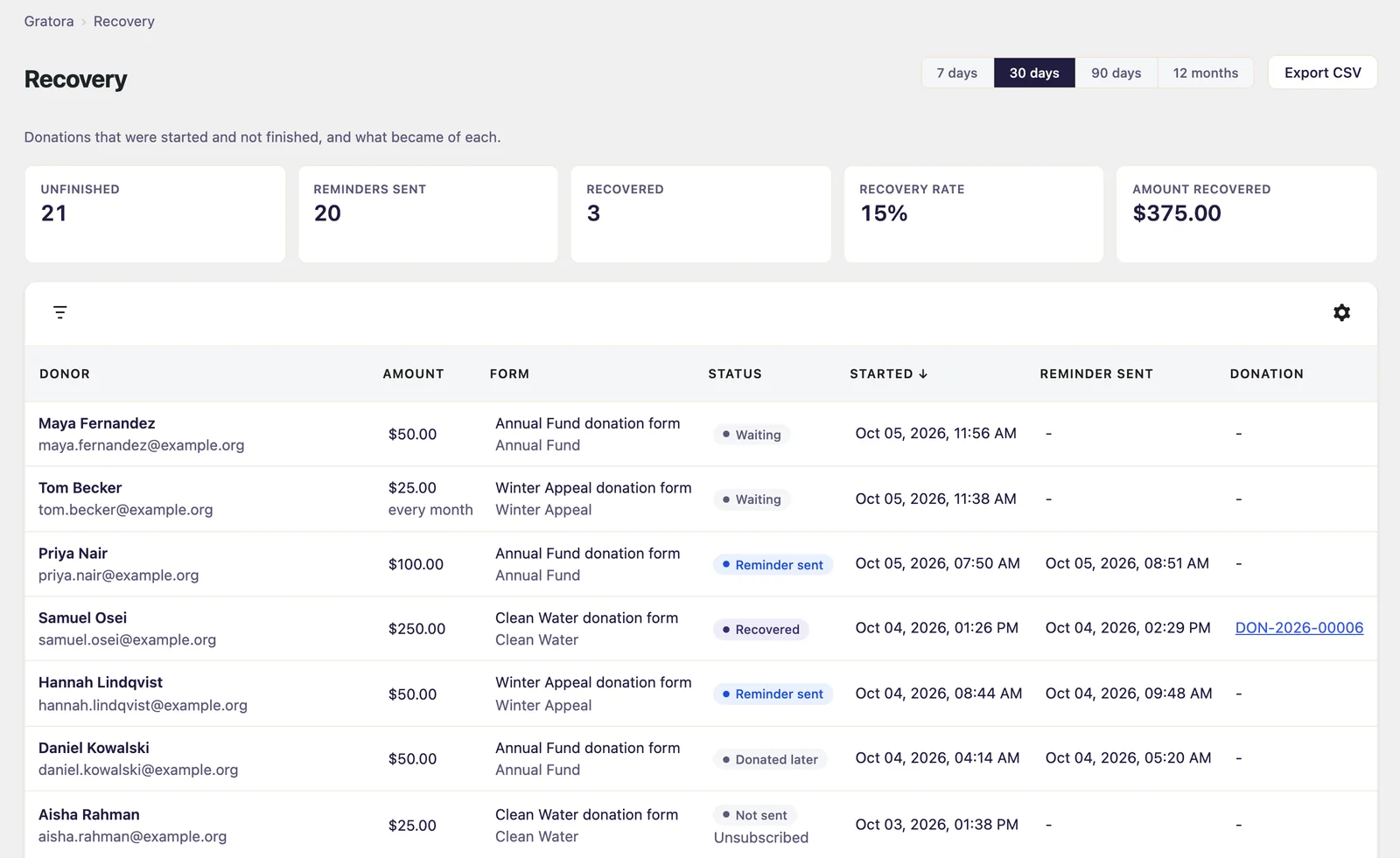
- A Recovery screen with the figures, the list behind them and a CSV export.
- A link in every reminder to stop further reminders.
Your forms look the same. There is no block to place.
Set it up
- Go to Fundraising > Settings > Recovery.
- Under Campaigns that take part, tick the campaigns whose donors should be reminded. None is ticked to begin with, and until one is, nothing is saved or sent.
- Turn on Include new campaigns automatically if every campaign you create from now on should take part.
- Choose Send the reminder after. It runs from 15 minutes to 24 hours, counted from the last thing the donor did on the form, and starts at 1 hour.
- Click Save changes.
- Read the wording of the reminder under Fundraising > Settings > Emails, in the Donation reminder template.
- Add the suggested wording to your privacy policy. It is in the WordPress privacy policy guide, under Settings > Privacy.
Send reminders is the main switch and is on from the start. Most reminders in a day is a ceiling in case something goes wrong, and starts at 100.
Nothing is saved or sent while a form is in test mode.
Who gets a reminder
On the campaigns you chose, two kinds of people:
- Someone who pressed Donate and did not pay.
- Someone who typed their email and an amount into a form and left before pressing Donate.
Each gets one reminder. For the second kind, the email, name and amount are saved as they are typed. To remind only the first kind, turn off Also remind people who left before pressing Donate.
Some people are never reminded, such as someone paying by bank transfer. See Who gets a donation reminder.
What the donor gets
One email with the amount they chose and a link back. The link opens the page the form is on with their amount, email and name filled in, and works for 7 days.
The Recovery screen
Go to Fundraising > Recovery. The figures cover the period chosen at the top: 7 days, 30 days, 90 days or 12 months.
| Figure | What it counts |
|---|---|
| Unfinished | Donations that were started and left. One still inside the delay is not counted yet |
| Reminders sent | Reminders that went out |
| Recovered | Donations made through a reminder’s link and paid |
| Recovery rate | Recovered as a share of reminders sent |
| Amount recovered | The total of the recovered donations, in your default currency |
The list underneath shows each unfinished donation with its status.
| Status | What it means |
|---|---|
| Waiting | No reminder has gone out yet |
| Reminder sent | The reminder went out and no donation has followed |
| Recovered | The donor came back through the link and paid |
| Donated later | The donor got a reminder, then donated some other way |
| Not sent | No reminder went out. The reason is shown underneath |
Click Export CSV to download the list for the chosen period.