
An automation rule does something for a donor when something happens: when a donor’s first donation is completed, it can add a tag and make a task to say thank you. Rules are carried out in the background, shortly after what sets them off. To set the add-on up, see Get started with Donor CRM.
Rules need Use the donor CRM and View donors.
Write a rule
- Go to Fundraising > CRM and open Automation.
- Click New rule and enter a Name.
- Under When, choose what sets the rule off. The sentence under it says what does and does not.
- Under If, choose who the rule is for: Every donor, Donors who match conditions or Donors in a segment.
- Under Then, choose what the action does and fill in its boxes. Click Add an action for more. They are carried out in order.
- Tick At most once for a donor, ever for a rule such as a welcome.
- Click Save.
A new rule is saved switched off. Switch it on in the On column of the list when it is ready.
What sets a rule off
| Group | Triggers |
|---|---|
| Donations | A donation is completed, A donor’s first donation is completed, A donation is refunded, A donation fails |
| Recurring plans | A recurring plan starts, A recurring donation renews, A renewal fails, A plan is paused, A plan resumes, A plan’s amount changes, A plan is cancelled |
| The CRM | A tag is added, A tag is removed, A donor enters a segment, A donor leaves a segment, No donation for a number of days, A task becomes overdue |
No rule is carried out for a test donation, a test plan or a donor known only through test donations.
Entering or leaving a segment, a number of days without a donation and an overdue task are looked for once an hour, so those rules are not instant. A donor who enters a segment and leaves it within the hour is not seen, and donors already in a segment when the rule is switched on have not entered it.
Who a rule is for
Donors who match conditions takes the same rules as a segment. Donors in a segment names one. Either is asked when the rule is carried out, of the donor as they are then. See Segments in Donor CRM.
For a trigger with a donation, And of the donation can also ask about Its amount, The campaign it is for, The fund it is for, and for a completed donation Whether it is one-time or the first of a recurring plan.
What a rule does
| Action | What it does |
|---|---|
| Add a tag, Remove a tag | Puts a tag on the donor or takes it off |
| Set a custom field | Sets a field’s value, or clears it |
| Make a task | Makes a task due in a number of days from 0 to 365, or with no due day, for an owner or nobody. Its owner gets no email |
| Tell staff by email | Emails up to five people, with an optional line you write |
A rule set off by an overdue task cannot make a task. What one rule does can set off another, such as a tag it adds, but never itself, and a chain of rules stops after five.
What a rule did
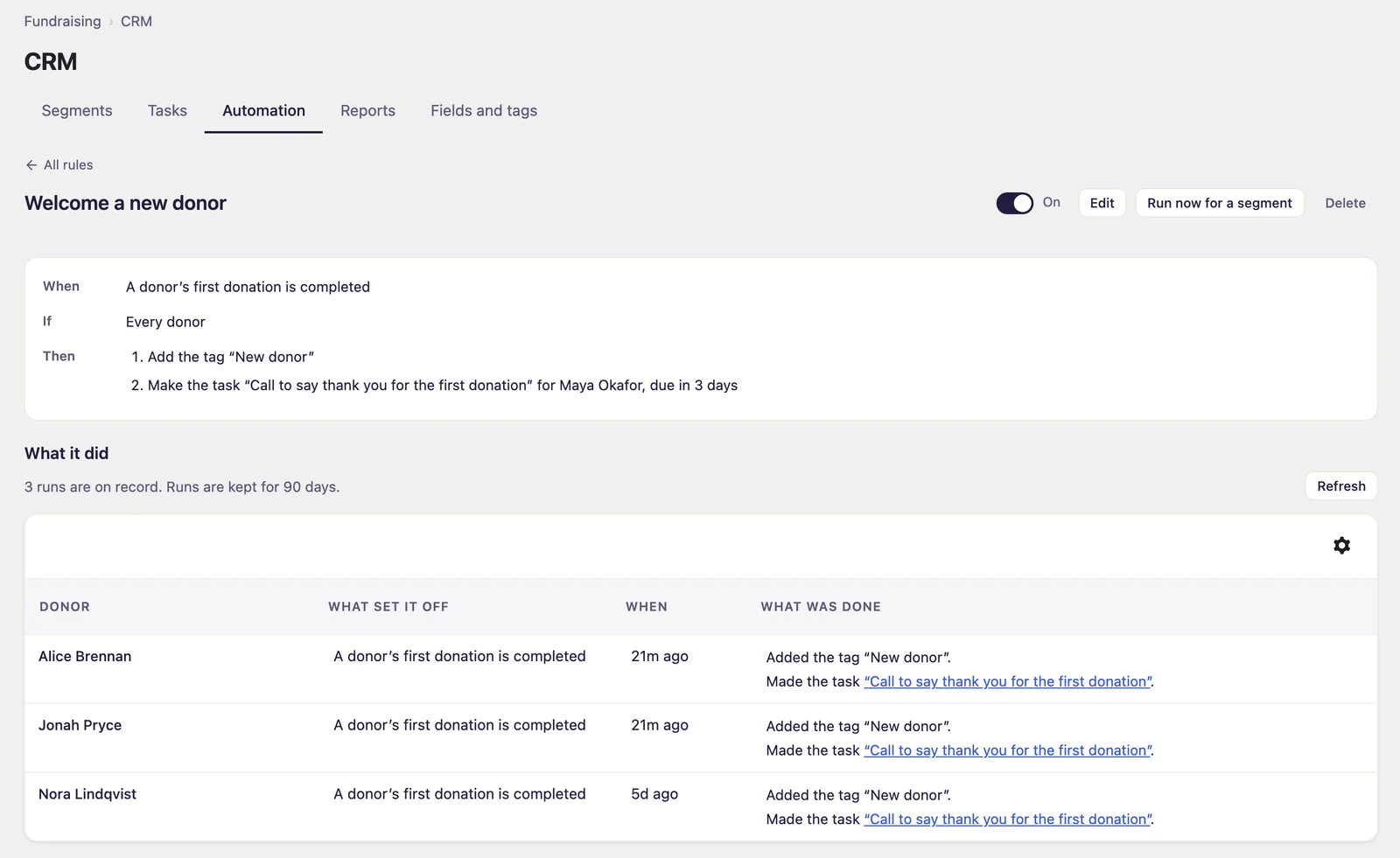
Click a rule’s name to open its page. It shows the rule in words, its switch, Edit, Run now for a segment and Delete. Under What it did, each run lists the donor, what set it off, when, and what was done, one sentence for each action. Runs are kept for 90 days. Press Refresh to read them again.
A donor’s profile also has an Automation card that says which rules did what for that donor.
Run a rule for a segment
- On the rule’s page, click Run now for a segment.
- Choose a Segment. The dialog says how many donors are in it now.
- Click the button, which names the count, such as Run for 16 donors.
The donors are queued and the rule is carried out for them in the background, whatever usually sets it off. Its conditions are still asked of each donor, and a switched-off rule is carried out all the same and stays off. A run cannot be taken back as a whole. It is not offered for a rule that asks about the donation.
The email notice
Tell staff by email sends the Automation notice email: the rule’s name, what happened, your line and a link to the donor’s profile, and nothing else about the donor. One rule sends at most 20 an hour. Edit it or switch it off under Fundraising > Settings > Emails, where Gratora 1.2.2 or later lists it under Staff emails. While it is off, the run says nobody was told.
The lines over the list
| Line | What it means |
|---|---|
| This site is in test mode | No rule is carried out for test donations. |
| Events have been waiting to be carried out, the oldest since a time | Shown after 15 minutes. Rules are carried out by the site’s scheduled work, which may not be running. Ask whoever looks after the site to check that WP-Cron runs. |
| Donors queued by “Run now” are waiting to be carried out | A run for a segment is queued behind other work. |
| Nothing has been carried out for more than 15 minutes | A run for a segment is waiting and the scheduled work may have stopped. Check WP-Cron as above. |
| Events could not be carried out | The site’s background work stopped three times while it had them, and they are not tried again. The line goes once they are 90 days old. |
When something a rule names is deleted
Deleting a tag, a field or a segment that a rule names stops the rule until you edit it. Its page says what has gone. Deleting a rule deletes the record of its runs, and its question says how many.