
A push puts a tag named after a segment on its donors at your mailing list service, through the Connect add-on, and brings that tag up to date once a day. To set the add-on up, see Get started with Donor CRM.
A push only tags donors Connect already holds at that destination, because Connect has sent them there, and who said yes to its consent purpose. Nobody is added to a list, and nobody is unsubscribed or deleted. Taking a tag off is only that.
Before you start
- Gratora Connect 1.2.0 or later, active. Without it, or with an older version, nothing of the push is offered and the rest of the add-on works as before.
- A Connect destination at Mailchimp, Kit or ActiveCampaign that is switched on, with Lawful basis set to Consent and a Consent purpose named. MailerLite, Brevo and MailPoet destinations, which use groups or lists, and webhooks cannot take a tag. See Get started with Connect.
- Permissions: Use the donor CRM, View donors and Connect’s Manage integrations.
At Kit and ActiveCampaign a tag belongs to the whole account, so every destination on that account shares it.
Start a push
- Go to Fundraising > CRM, open Segments and open the segment.
- Under Pushed to Connect, click Push to Connect.
- Under Where to push it, choose a destination.
- Click Start pushing.
The screen says “Push started.” and the push gets a row. Its tag is the segment’s name at that moment, and keeps that name if the segment is renamed later. A destination that cannot be chosen is shown switched off, with the reason.
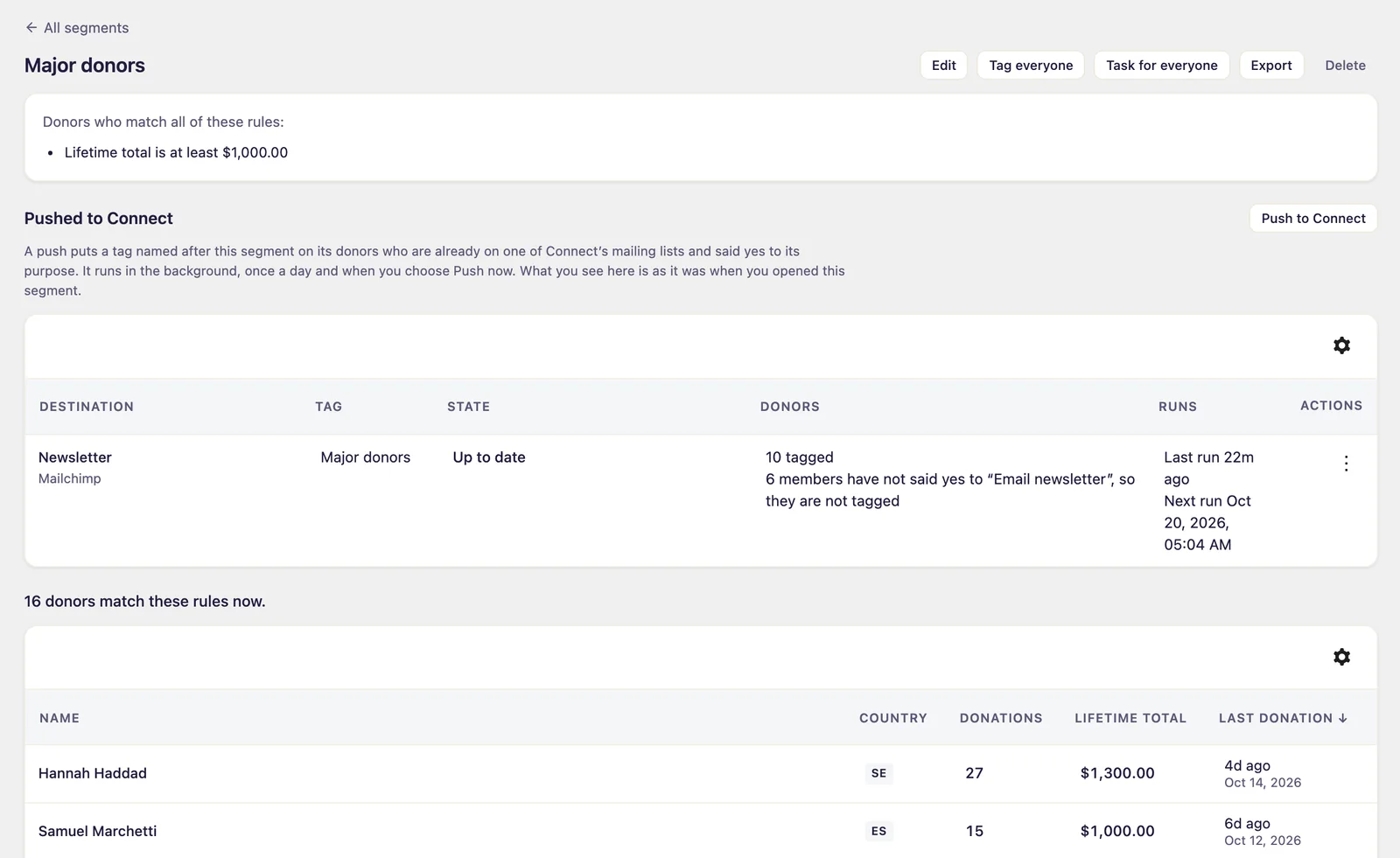
What the row says
| Column | What it shows |
|---|---|
| State | Running, Waiting: the provider asked Connect to slow down, Up to date, Not up to date: the last run could not finish, Stopping: taking the tag off or Stopped. A problem is explained under it, with Connect’s reason where there is one |
| Donors | How many are tagged, waiting to be tagged or waiting for the tag to come off, how many members have not said yes to the purpose, and how many were passed over and why |
| Runs | When it last ran and when it runs next |
The row shows the push as it was when you opened the segment. Open the segment again to see the latest.
When it runs
A push runs in the background once a day. To run it sooner, choose Push now in the row’s menu, and open the segment again later to see what it did. Each run tags the members who qualify and takes the tag off donors who left the segment or withdrew their yes. A donor passed over, for example one not yet on the list in Connect, is asked about again at the next run.
When a donor is erased, removing them at the service is left to Connect’s own erasure. At Kit, which Connect leaves for a person to delete, the tag stays on the subscriber until then.
Stop a push
- In the row’s menu, choose Stop.
- The question names the tag, as in Take the tag “Major donors” off everyone it was put on. Leave it ticked to remove the tag, or untick it to leave the tag where it is.
- Click Stop pushing.
With the tag being taken off, the push is Stopping until the tag is off everyone, then Stopped. While it is stopping, Leave the tag on in the menu gives that up. A tag that is left on stays on those donors, and no later push or stop takes it off. A stopped push stays listed with how it ended until you choose Remove from the list.
Deleting a pushed segment stops its push and takes its tag off.
If a push is refused or stops
The messages name your destination and tag. Here they are for a segment called Major donors and a destination called Newsletter.
| What the screen says | What to do |
|---|---|
| This segment is pushed there already. | Use the push that is there, or stop it first. |
| The tag is still being taken off there. | Push the segment there again once that push has stopped. |
| Newsletter already has a tag “Major donors”. | A push takes its tag off everyone it put it on, and cannot tell who had it before. Rename the segment, or remove that tag at the service, then push it. |
| The push of “Top donors” to Newsletter already puts a tag “Major donors” where this destination’s tags live. | Another segment’s push uses that tag. Two pushes cannot share a tag: rename this segment, or stop that push first. |
| Connect could not tell whether Newsletter already has a tag “Major donors”. | Try again in a moment. |
| Connect has no destination yet. | Add one under Fundraising > Connect, then push the segment. |
| Tags are put only on donors who agreed to a destination’s consent purpose, and this destination does not rely on consent. | In Connect, set the destination’s Lawful basis to Consent, with the purpose your donation form records. |
| None of these destinations can take a tag. | Add a Mailchimp, Kit or ActiveCampaign destination that is on and asks for consent to a purpose. |
| The destination is switched off in Connect. | Switch it on again. The push goes on at its next run. |
| The tag could not be taken off there, so the push keeps the donors who have it until it can. | Fix the cause at the service, or stop the push with the tag left on to give up. |
| The provider refused the tag. | Check the tag’s name at the service. The push tries again at its next run. |
| Gratora Connect is off, or its version cannot put tags on contacts. | Switch on Connect 1.2.0 or later, then try again. |